Your AI coding agent's dev container is not a sandbox: docker.sock, --privileged and ~/.ssh mounts
Running Claude Code, Codex or Aider in a dev container feels safe, until the container gets privileged mode, the host Docker socket, the host network or your ~/.ssh and ~/.aws folders. Here is what the Docker and Dev Container docs say about each setting, how to fix them, and BoxEscape, a free VS Code extension that flags them in devcontainer.json, Compose files and docker run scripts.
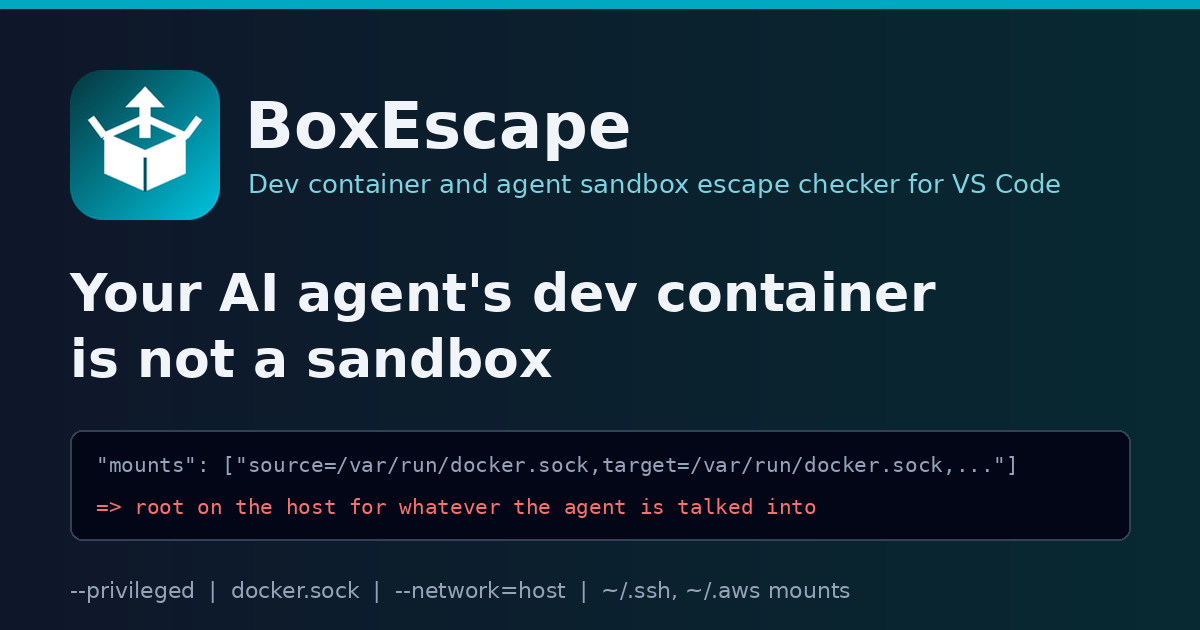
"Just run the agent in a dev container" has become the standard answer to "is it safe to let an AI coding agent run commands on its own?". The idea is good. The container is a box, the agent can break things inside the box, and your laptop stays out of it.
Then the box gets configured. Here is a made-up devcontainer.json, but every line in it is something I have seen in real repositories and setup guides:
{
  "name": "shop-api",
  "image": "mcr.microsoft.com/devcontainers/javascript-node:22",
  "privileged": true,
  "runArgs": ["--network=host", "--security-opt", "seccomp=unconfined"],
  "mounts": [
    "source=/var/run/docker.sock,target=/var/run/docker.sock,type=bind",
    "source=${localEnv:HOME}/.ssh,target=/home/node/.ssh,type=bind",
    "source=${localEnv:HOME}/.aws,target=/home/node/.aws,type=bind"
  ],
  "postCreateCommand": "npm install -g @anthropic-ai/claude-code",
  "remoteUser": "root"
}
Each line has a reason. privileged because Docker-in-Docker needed it once. The Docker socket so the agent can run docker compose up. Host network so localhost:5432 works. seccomp=unconfined from a Stack Overflow answer about a debugger. ~/.ssh so git push works, ~/.aws so the agent can read a bucket. Root because a package install failed.
Put together, this dev container docker.sock setup is not a sandbox. Any one of the first four lines is enough for code in the container to take over the host, and the last three hand over your keys without any escape at all. The agent does not need to be malicious. It only needs to read one README, issue or web page with a prompt injection in it.
TL;DR: a dev container or Docker sandbox only isolates an AI coding agent if you leave the isolation on.
privileged: true, a mounted/var/run/docker.sock,--network=hostor--pid=host,SYS_ADMIN,seccomp=unconfined, and bind mounts of~/.ssh,~/.aws,~/.kubeor$HOMEeach undo part of it. Drop them, give the agent short-lived repository-scoped tokens, run it as a non-root user, and make sure the egress firewall script actually runs. BoxEscape checks all of that in VS Code.
What each setting gives away
I went back to the official docs for every one of these, because "it is a container, it is isolated" is the assumption that causes all of them.
privileged: true / --privileged. The docker run reference lists what the flag does: it enables all Linux kernel capabilities, disables the default seccomp and AppArmor profiles, grants access to all host devices and makes /sys read-write. "In other words, the container can then do almost everything that the host can do", and "a container with --privileged is not a securely sandboxed process". The devcontainer.json reference says the same in one line: privileged is "required for things like Docker-in-Docker, but has security implications particularly when running directly on Linux".
The Docker socket. Mounting /var/run/docker.sock gives the container the Docker API of the host. The Docker Engine security page explains why that matters: "only trusted users should be allowed to control your Docker daemon", because Docker lets you share any host directory with a container without limiting access rights. Anyone who can reach the socket can start a new privileged container with the host's / mounted. The Linux post-install guide puts it even more bluntly about the docker group: it "grants root-level privileges to the user". Mounting the socket into an agent's container gives the agent that same group membership.
Host network and host PID. With --network=host, the host network driver docs say the container's "network stack isn't isolated from the Docker host". Every service bound to the host's localhost is now local to the agent, and an egress firewall you set up inside the container is editing the host's network, not a private one. --pid=host lets it see every host process.
seccomp=unconfined. Docker's seccomp docs describe the default profile as the filter that blocks dangerous system calls, and unconfined as running without it. devcontainer.json even shows "securityOpt": ["seccomp=unconfined"] as its example for securityOpt, which is why it gets copied so often.
Credential mounts. None of the settings above are needed to leak ~/.ssh or ~/.aws. A bind mount is enough, and Docker's bind mount docs note that bind mounts "have write access to files on the host by default". The Claude Code dev container docs are direct about this: "Avoid mounting host secrets such as ~/.ssh or cloud credential files into the container; prefer repository-scoped or short-lived tokens." The same page warns that with --dangerously-skip-permissions, a dev container does "not prevent a malicious project from exfiltrating anything accessible inside the container".
That last sentence is the whole point. The container decides what the agent can reach. Everything you mount or share is in scope.
How to fix it by hand
For the file at the top:
{
  "name": "shop-api",
  "image": "mcr.microsoft.com/devcontainers/javascript-node:22",
  "postCreateCommand": "npm install -g @anthropic-ai/claude-code",
  "remoteUser": "node"
}
That looks like I deleted everything, and that is roughly right. What to do instead:
- Need Docker inside? Use a rootless or remote Docker host for the agent, not the host socket. If you must use Docker-in-Docker, know that it needs a privileged container, and do not run an unattended agent in it.
- Need a database on localhost? Run it as a Compose service next to the dev container and use the service name, or publish only that one port.
- Need
git push? Use a fine-grained, repository-scoped token with an expiry, set as a secret for the session. If you forward the SSH agent, every key loaded in it is usable from the container for as long as it runs. - Need cloud access? Short-lived credentials for one role, not your whole
~/.awsfolder. - Debugger needs ptrace? Add only
SYS_PTRACEincapAdd. The devcontainer reference shows exactly that example. - Want an egress firewall? The Claude Code reference container runs an
init-firewall.shfrompostStartCommandand addsNET_ADMINandNET_RAWso iptables works. If the script is missing, its failure is swallowed with|| true, or the capabilities are missing, the container starts with open network access.
BoxEscape: the same checks in VS Code
I wanted these lines flagged where they are written, so I built BoxEscape, a free VS Code extension.
code --install-extension jaytankdev.boxescape
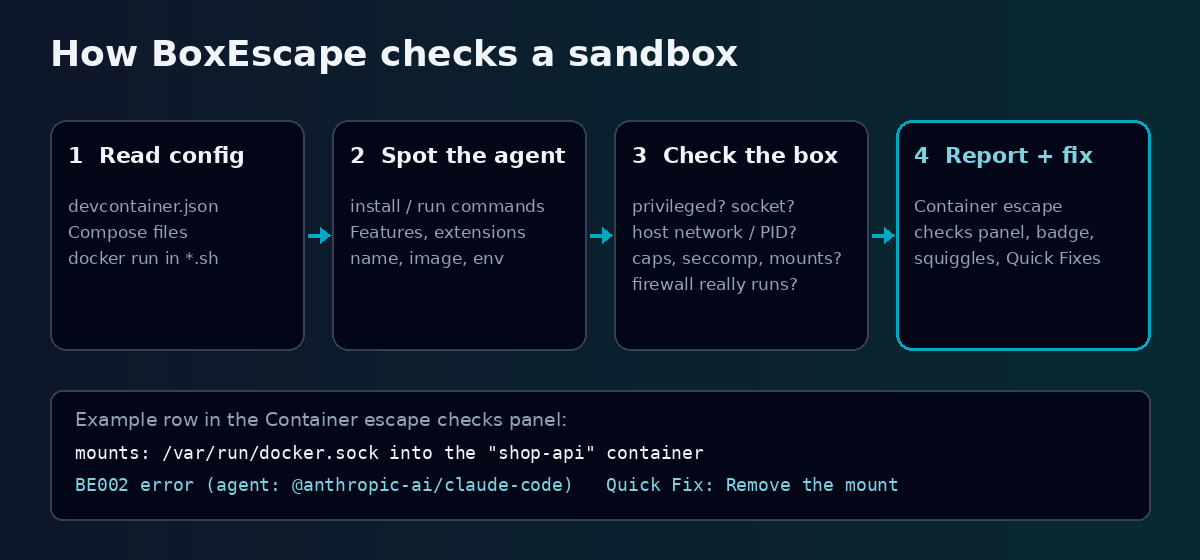
BoxEscape reads devcontainer.json (including runArgs, mounts, workspaceMount, capAdd, securityOpt, Features and the Compose file a dev container points to), Docker Compose files, and docker run / podman run lines in shell scripts that launch an agent CLI. It works out whether a container runs an AI coding agent from its name, image, lifecycle commands, Dockerfile, installed packages, Features, VS Code extensions or environment, and it makes the credential and socket rules stricter when it does. Claude Code, Codex, Aider, OpenCode, OpenHands, Cline and Cursor Agent are known; you can add your own with boxEscape.extraAgentPatterns.
These are the real findings it reports on the made-up file above. It spotted the agent from postCreateCommand installs @anthropic-ai/claude-code, so every message ends with a note that whatever a prompt injection talks the agent into, it can do there:
devcontainer.json:4   BE001 error    privileged: true runs the "shop-api" container privileged
devcontainer.json:5   BE003 warning  runArgs --network: host network shared with the "shop-api" container
devcontainer.json:5   BE005 error    runArgs --security-opt: seccomp=unconfined in the "shop-api" container
devcontainer.json:7   BE002 error    mounts: /var/run/docker.sock into the "shop-api" container
devcontainer.json:8   BE006 error    mounts: ~/.ssh into the "shop-api" container
devcontainer.json:9   BE006 error    mounts: ~/.aws into the "shop-api" container
devcontainer.json:12  BE011 warning  remoteUser: root for the agent in the "shop-api" container
The same works for a wrapper script. A made-up agent.sh that runs docker run ... -v "$HOME/.config/gh":/root/.config/gh -v /var/run/docker.sock:/var/run/docker.sock --cap-add SYS_ADMIN --pid host my-agent-image codex --full-auto gets BE006 for the GitHub CLI credentials, BE002 for the socket, BE004 for SYS_ADMIN and BE003 for the host PID namespace. And a postStartCommand of sudo /usr/local/bin/init-firewall.sh || true gets BE010: init-firewall.sh failure is ignored.
Findings show up as squiggles, and a BoxEscape icon in the activity bar opens the Container escape checks panel: findings are grouped by file, each row names the container and the setting, fixable rows have an inline Quick Fix button, and a badge shows the count. The status bar shows BoxEscape: N. Quick Fixes handle the mechanical edits: remove privileged: true or --privileged, remove a capability from capAdd / cap_add, remove an entry from securityOpt, remove a mount or volume, make a mount read-only (,readonly or :ro), or remove the docker-outside-of-docker Feature.
The rules
| ID | What it catches | Default |
|---|---|---|
| BE001 | Privileged container | Error |
| BE002 | Host Docker socket shared (Docker, Podman, containerd) | Warning, error with an agent |
| BE003 | Host network, PID, IPC, user or cgroup namespace shared | Warning |
| BE004 | Dangerous capability added (SYS_ADMIN and similar) |
Error |
| BE005 | Confinement turned off (seccomp, apparmor or systempaths set to unconfined, label=disable) |
Error |
| BE006 | Host credentials (~/.ssh, ~/.aws, ~/.kube, ~/.config/gh ...) or system path mounted |
Warning, error with an agent |
| BE007 | Folder above the workspace mounted | Warning |
| BE008 | SSH or GPG agent forwarded | Warning, error with an agent |
| BE009 | Host device passed through | Warning |
| BE010 | Agent firewall not effective (missing, failure ignored, no NET_ADMIN, never run) |
Information |
| BE011 | Agent runs as root | Warning |
Every rule can be set to another severity or off with boxEscape.rules. boxEscape.checkScripts turns the shell script check off, and boxEscape.exclude skips folders.
Privacy
BoxEscape is fully offline. It reads devcontainer.json, Compose files, Dockerfiles and shell scripts in the workspace, runs nothing, and sends nothing anywhere.
Limitations
- It checks configuration, not a running container. It does not ask Docker what is actually mounted.
- The shell check looks at
docker runandpodman runlines that launch a known agent (or one of your patterns). Other wrappers and generated command lines are not followed. - Settings that only make sense for a specific workload, like
privilegedfor Docker-in-Docker, are still reported. If you accept the risk for a container that never runs an agent, turn the rule down for that workspace. - Files over 1 MB are skipped, and the workspace scan stops at
boxEscape.maxFiles(2000 by default). Open files are always checked.
FAQ
Is it safe to mount docker.sock into a dev container? Not for an AI agent or any code you do not fully trust. Access to the socket is access to the Docker daemon, which the Docker docs treat as root-level access to the host.
Is a dev container enough to sandbox Claude Code or Codex? It can be a good boundary if it stays a boundary: no privileged mode, no host socket, no host namespaces, no credential mounts, a non-root user and a working egress firewall. Even then, the Claude Code docs say to use it only with trusted repositories.
Why is seccomp=unconfined so common in devcontainer.json? Debuggers and some profilers needed it, and the devcontainer.json reference uses it as the securityOpt example. For a debugger, SYS_PTRACE alone is usually what you need.
Can I mount ~/.ssh read-only instead? Read-only stops the agent changing your keys, not reading them. Use a short-lived, repository-scoped token instead.
Try it
- Install: search "BoxEscape" in the VS Code Extensions view, or run
code --install-extension jaytankdev.boxescape - Marketplace: marketplace.visualstudio.com/items?itemName=jaytankdev.boxescape
- Source (MIT): github.com/jay-tank/boxescape
A sandbox is only as strong as the settings that nobody reviews twice. Open your .devcontainer folder once with BoxEscape installed and see what your agent can actually reach.
Issues and suggestions are very welcome on GitHub.
About the author
- Cloud & Platform Engineer focused on building systems that scale and endure. I explore how infrastructure, automation, and engineering practices come together to support modern software teams.
Comments
Join the discussionNo comments yet. Be the first to comment.