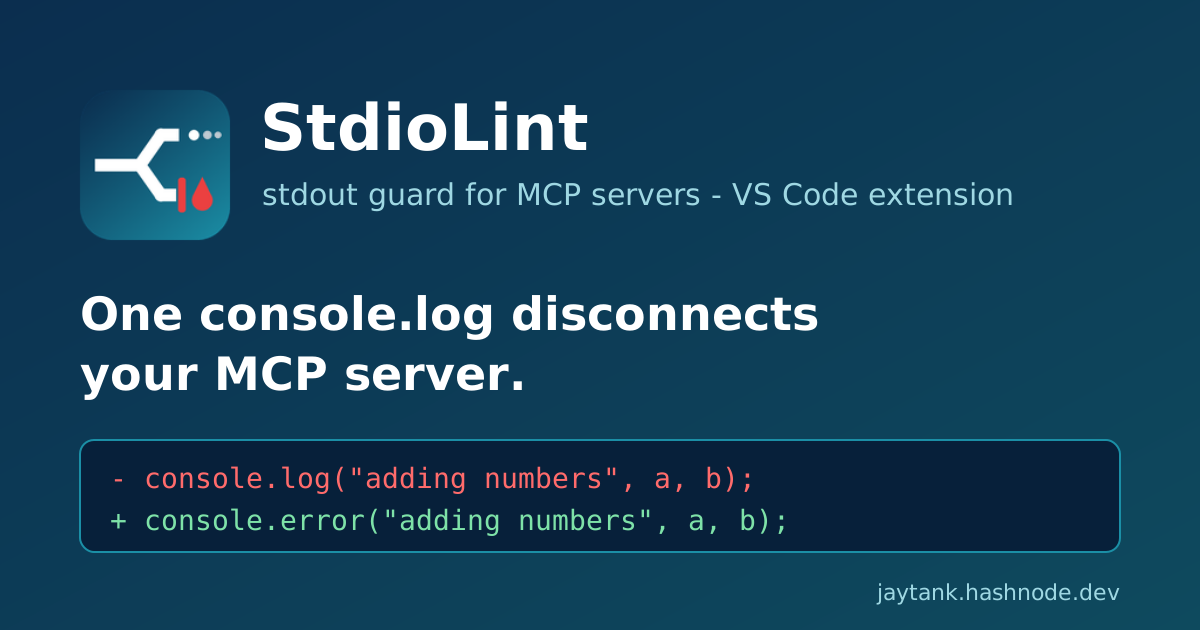
One console.log disconnects your MCP server: the stdout bug every stdio server author hits
A stdio MCP server speaks JSON-RPC over its own stdout, so a single stray `console.log` or `print()` corrupts the stream and the client drops the connection with an error that points nowhere. Here is why it keeps shipping in real servers, why your quick manual test never catches it, and StdioLint, a free VS Code extension that flags the write on the line where you type it.
You wire up a new tool in your MCP server, restart the client, and ask the agent to use it. Instead of an answer you get this:
MCP error -32000: Connection closed
Or, depending on the client, Unexpected token 'a', "adding numbers" is not valid JSON, or just a server that shows as "disconnected" in the sidebar. You check the tool code. It looks fine. You run the server by hand in a terminal and it starts without complaint. Nothing is obviously broken.
The culprit is usually one line you added while debugging:
server.registerTool("add", { /* ... */ }, async ({ a, b }) => {
  console.log("adding numbers", a, b);   // <- this is the bug
  return { content: [{ type: "text", text: String(a + b) }] };
});
That console.log is not a harmless debug message. In a stdio MCP server it is a protocol violation.
TL;DR: in a stdio MCP server, stdout is the JSON-RPC channel. Any
console.log,print()or logger that writes to stdout corrupts the stream and the client disconnects. Log to stderr instead, and let StdioLint flag the writes in VS Code before they ship.
Why console.log breaks a stdio MCP server: stdout is the wire
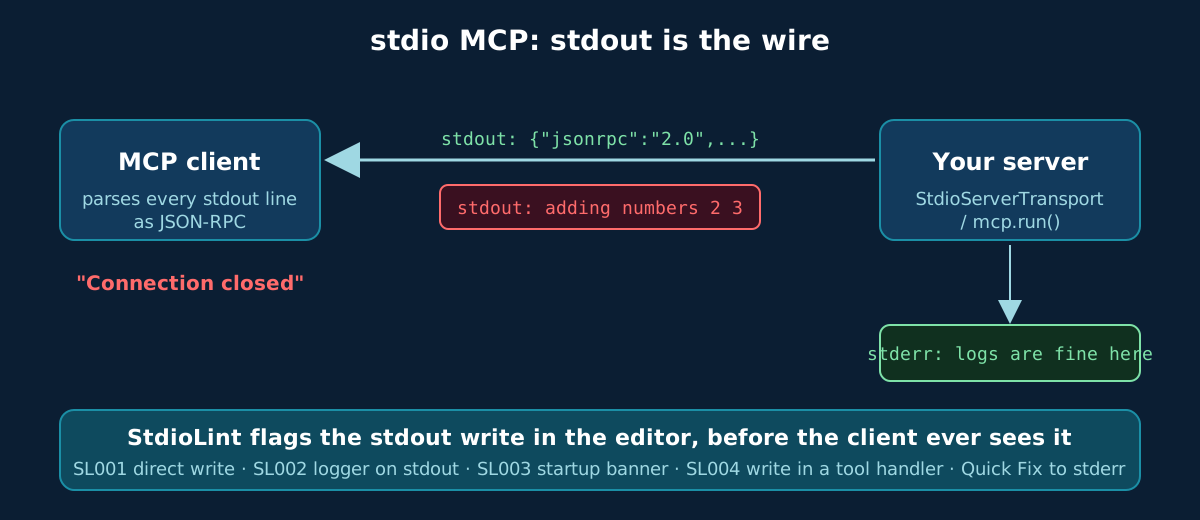
MCP has two main transports. With Streamable HTTP the protocol travels over HTTP and your process output is just logs. With stdio, the client launches your server as a child process and talks to it through the process's own standard input and standard output. Every byte your server writes to stdout is read by the client as the next JSON-RPC message.
The specification is explicit about what that means for you:
The server MUST NOT write anything to its
stdoutthat is not a valid MCP message. (MCP specification, stdio transport)
So when your tool prints adding numbers 2 3, the client receives that text in the middle of its message stream, fails to parse it as JSON-RPC, and in most clients tears the connection down. The same spec also gives you the escape hatch: the server may write to stderr, and clients may capture or ignore it. Logging is fine. Logging to stdout is not.
Why this keeps shipping
If the rule is that simple, why does it bite so many real projects? A few examples from public issue trackers:
espressif/esp-idf#19087:
print()to stdout inidf.py mcp-servercorrupts the JSON-RPC stream and breaks stdio clients.yamadashy/repomix#1866: running with
--mcp --verbosesends logger output to stdout and corrupts the channel.ruvnet/ruflo#835: stdio mode corrupted by stdout log messages.
HaithamOumerzoug/keycloak-mcp#6:
console.logcalls inlogger.tsandkeycloak.tscorrupt the stdio transport.
Three things make it easy to ship:
Your manual test passes. Running
node dist/server.jsin a terminal shows your log line right next to the JSON-RPC traffic and nothing crashes. The failure only happens when a real client is parsing stdout.The write is often not in the server file. Look at the last two issues: the
console.loglived in a logger or helper module that the server imports. Reviewingserver.tswould never find it.Defaults hide it. In Node,
console.log,console.infoandconsole.debugall go to stdout, whileconsole.errorandconsole.warngo to stderr (Node console docs). pino writes to stdout by default, and winston's Console transport does too unless you setstderrLevels. In Python,print()goes to stdout, butlogging.basicConfig()andtqdmdefault to stderr. Nobody remembers all of that while debugging at midnight.
Why a generic linter doesn't solve it
You might reach for ESLint's no-console or Ruff's T201. They help, but they are the wrong shape for this problem:
They flag every console call and print everywhere, including
console.errorandprint(x, file=sys.stderr), which are exactly what you should be using.They have no idea which files belong to an MCP server. Your CLI scripts, build tools and HTTP servers all get the same noise.
Their fix is "delete the line", when what you want is "keep the log, send it to stderr".
Runtime tools like MCP Inspector will show you the corruption once it happens, but only on the code paths you actually exercise during that session.
StdioLint: catch it on the line where you type it
StdioLint is a free, open-source VS Code extension I built for exactly this. It is MCP-aware:
It finds your stdio server entry files: JS/TS files that start a
StdioServerTransportfrom@modelcontextprotocol/sdk(orfastmcpwithtransportType: "stdio"), and Python files that useFastMCP/mcp.serverand callmcp.run(), where stdio is the default.It follows the local modules they import, a few levels deep, so the
console.loginlogger.tsis caught too.It ignores everything else: servers that only use Streamable HTTP or SSE, ordinary scripts, and writes inside strings or comments.
It reports four rules in the Problems panel:
| Rule | What it catches | Example |
|---|---|---|
| SL001 | A direct stdout write | console.log(x), process.stdout.write(s), print(x), sys.stdout.write(s) |
| SL002 | A logger or stream bound to stdout | logging.basicConfig(stream=sys.stdout), pino(), winston Console() without stderrLevels, rich Console() |
| SL003 | A startup banner before the transport starts | print("Server starting...") right before mcp.run() |
| SL004 | A stdout write inside a tool, resource or prompt handler | print(...) inside an @mcp.tool() function |
Every finding comes with a Quick Fix that keeps your log and moves it to stderr: console.log becomes console.error, print(x) becomes print(x, file=sys.stderr) (adding import sys when needed), pino(opts) becomes pino(opts, pino.destination(2)), and so on.
Here is the tool from the top of this post, before and after the fix:
// Before: SL004 - console.log inside an MCP handler corrupts the stream
server.registerTool("add", { /* ... */ }, async ({ a, b }) => {
  console.log("adding numbers", a, b);
  return { content: [{ type: "text", text: String(a + b) }] };
});

// After one click on the Quick Fix
server.registerTool("add", { /* ... */ }, async ({ a, b }) => {
  console.error("adding numbers", a, b);
  return { content: [{ type: "text", text: String(a + b) }] };
});
And the Python version:
import sys
from mcp.server.fastmcp import FastMCP

mcp = FastMCP("demo")

@mcp.tool()
def greet(name: str) -> str:
    print("greeting", name, file=sys.stderr)   # was print("greeting", name): SL004
    return f"hi {name}"

if __name__ == "__main__":
    mcp.run()
A few details it gets right, because they matter in real code:
console.log = console.errorat the top of the entry file is honored for the whole server.Code under
if __name__ == "__main__":in an imported Python module is skipped, since it does not run on import.A transport chosen at runtime, like
mcp.run(transport=args.transport), counts as stdio, because the stdio path has to be clean too.Intentional writes can be silenced with
# stdiolint: ignore SL001or// stdiolint: ignore.
Privacy and limits
StdioLint reads your source files and analyzes them in memory. It makes no network requests, collects no telemetry, runs no processes and executes nothing, so it is safe in untrusted workspaces.
It is a static, heuristic tool, and I would rather be upfront about what that means. It cannot see output printed by a dependency at import time, output from native extensions, or writes through a stdout reference stored in a variable and used elsewhere. It follows relative imports and package-local Python imports, but not tsconfig path aliases or computed dynamic imports. For those cases, keep MCP Inspector in your loop.
FAQ
Why does my MCP server say "Connection closed" or "server disconnected"? With the stdio transport, a common cause is output on stdout that is not a JSON-RPC message: a console.log, a print(), a startup banner or a logger configured for stdout. The client fails to parse it and closes the connection.
Can I use console.log in an MCP server? Not in a stdio server. Use console.error (or console.warn), which write to stderr. In HTTP / SSE servers stdout is not the protocol channel, so console.log is fine there.
Where should MCP server logs go? To stderr. The MCP specification allows servers to write UTF-8 log output to stderr, and clients may capture, forward or ignore it. In Python, use print(..., file=sys.stderr) or the logging module, whose default handler already writes to stderr.
Does print() break a FastMCP server? Yes, when it runs over stdio, which is FastMCP's default for mcp.run(). print() writes to stdout unless you pass file=sys.stderr.
Try it
Install: search "StdioLint" in the VS Code Extensions view, or run
code --install-extension jaytankdev.stdiolintMarketplace: marketplace.visualstudio.com/items?itemName=jaytankdev.stdiolint
Source (MIT): github.com/jay-tank/stdiolint
If you maintain an MCP server, open it with StdioLint installed and run StdioLint: Scan Workspace. If it finds nothing, you just saved yourself a future "server disconnected" bug report. If it finds something, you just found it before your users did.
Issues and suggestions are very welcome on GitHub.