Stop committing .env files, node_modules and it.only: check your staged changes before you press Commit
Most "oops" commits are a .env file, a huge dump, node_modules or a leftover it.only, not hard bugs. Why hooks and .gitignore miss them, how to clean up, and a free VS Code extension that checks the git index live.
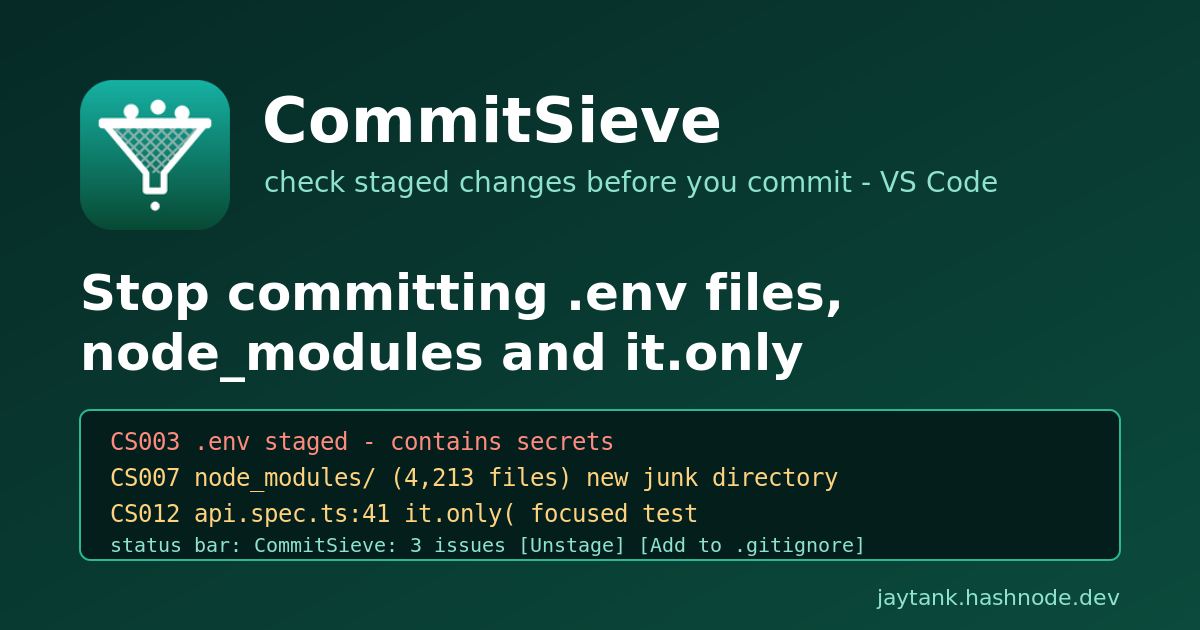
It is the end of the day, the fix finally works, and you click the + next to "Changes" to stage everything. You type "fix login redirect", press Commit, push, and close the laptop.
The next morning you look at the pull request and it has 4,812 changed files. Or it has only six, but one of them is .env, with the production database password on line 3. Or the diff is tiny and CI is green, which feels great until you notice the test count dropped from 412 to 9, because you left it.only( in the spec you were debugging.
None of these are hard problems. They are the most common accidents in day-to-day git work, and they all have the same shape: something got staged that should not have been, and nothing looked at the index before the commit happened.
TL;DR: check what is staged, not what is in your editor. A committed secret must be treated as leaked even if you delete it in the next commit. Pre-commit hooks help but need per-repo setup. CommitSieve checks the git index of every repository in your VS Code workspace as you stage, and shows the problems in the status bar before you press Commit.
What actually ends up in "oops" commits
After years of reviewing pull requests on DevOps and platform teams, the list is short and it repeats:
| Accident | Why it hurts |
|---|---|
.env, *.pem, id_rsa, credentials.json |
A secret in git history is a leaked secret. You have to rotate it, not just delete it. |
Tokens in .npmrc / .pypirc |
Registry publish tokens let anyone publish packages under your name. |
*.tfstate |
Terraform state often holds database passwords and keys in plain text. |
dump.sql, backup.zip, a 200 MB binary |
Bloats every clone forever and can hit GitHub's file size limits. |
node_modules/, dist/, .terraform/, .DS_Store |
Thousands of files of noise in review, and merge conflicts in generated code. |
<<<<<<< / >>>>>>> conflict markers |
Broken code that often still parses in YAML or Markdown. |
it.only(, fdescribe(, test.only( |
The test file reports PASS while most of its tests never run. |
debugger;, breakpoint(), binding.pry |
Freezes a process in production or in CI. |
The secret cases are the expensive ones. GitHub's own guide to removing sensitive data from a repository is blunt about it: once a credential has been pushed, consider it compromised and rotate it, because rewriting history does not undo the copies other people already fetched. GitGuardian's State of Secrets Sprawl 2024 counts millions of new secrets leaked in public commits every year.
It is not only a hobby-project problem. In 2022 Toyota disclosed that an access key for the T-Connect customer data server had sat in a public GitHub repository for almost five years after a subcontractor pushed part of the source code (BleepingComputer, GitGuardian's write-up).
The focused-test case is quieter but just as real. A committed .only does not fail anything. It makes the file report success while every other test in it is skipped, so the run totals and the CI verdict both look fine (example report).
Why hooks and .gitignore do not catch it
The usual answers are good, and you should use them. They just do not cover the gap on their own.
.gitignore only protects files that match a pattern before you stage them. A new repository, a dump.sql in an unusual folder, .env.local when the ignore file only lists .env, or a git add -f all go straight through. And it cannot see content: a conflict marker or a debugger; inside a tracked file is invisible to it.
Pre-commit hooks (githooks, the pre-commit framework, Husky, lint-staged) are the real fix for teams. But a hook lives in each clone. Somebody has to add the config, everybody has to install it, and it has to be set up again in every new repository, fork and throwaway clone. In practice most repositories you touch in a week do not have one, especially the small internal ones where a .env hurts the most.
Linters like eslint-plugin-no-only-tests catch focused tests, but only in projects that installed and configured them, and only for one language.
What is missing is something that looks at the git index itself, on your machine, in every repository you open, without anyone having to set it up.
Cleaning up if it already happened
Before the tool, the fix, because you may be reading this with a .env already in a commit.
Not pushed yet: unstage or remove it from the last commit, and ignore it.
# still only staged
git restore --staged .env

# already committed, not pushed
git rm --cached .env
echo ".env" >> .gitignore
git commit --amend --no-edit
Already pushed: rotate the secret first. That is the step that actually protects you. Then remove the file from history with git filter-repo (or BFG) following GitHub's guide above, and ask collaborators to re-clone. Removing the file in a new commit is not enough: it is still in history.
node_modules/ or dist/ committed: git rm -r --cached node_modules, add it to .gitignore, commit. The history still carries the weight, but the noise stops.
it.only merged: remove it and run the full suite. Expect some of the tests that were silently skipped to fail.
CommitSieve: check the staged changes, live
I built CommitSieve to close that gap from the editor side. It is a free VS Code extension that reads the staged changes of every git repository in your workspace, as you stage them, and tells you what should not be committed.
code --install-extension jaytankdev.commitsieve
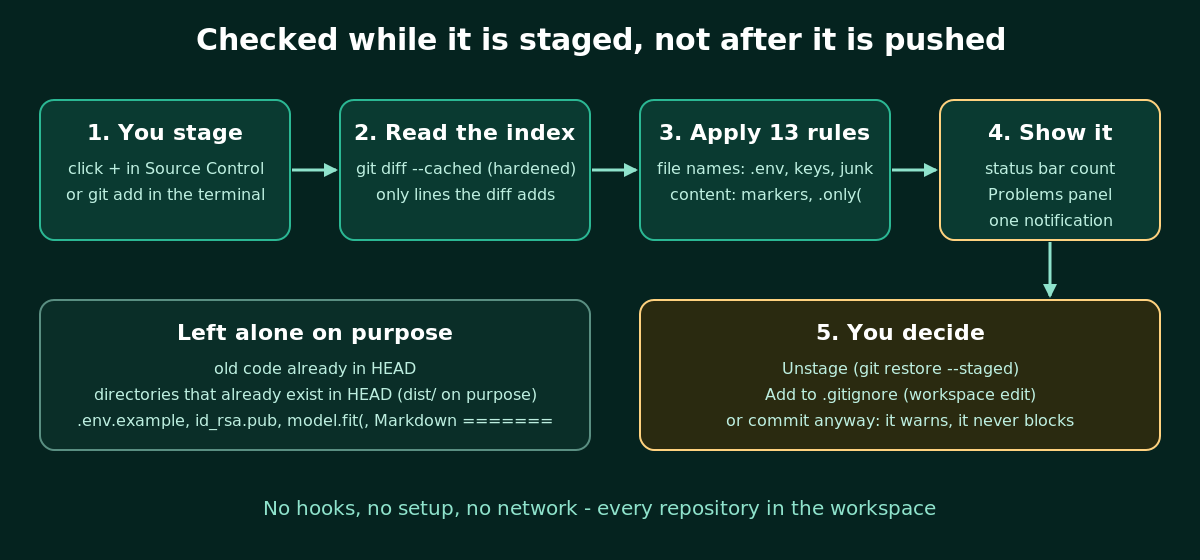
There is nothing to configure. The moment you stage something:
The status bar shows
CommitSieve: clean, orCommitSieve: 3 issueson a warning background. Click it for a list of findings. Each one opens the file (at the line for content findings) and has Unstage and Add to .gitignore buttons.Content findings (conflict markers, focused tests, debugger calls) show in the Problems panel on the right line.
When a newly staged change hits a blocker rule (a secret, a key, a state file, a conflict marker), you get one notification with a shortcut to review or unstage it.
The rules:
| Code | Default | Catches |
|---|---|---|
| CS001 | Warning | A staged file over 1 MB (configurable) |
| CS002 | Warning | A newly added binary: executables, archives, databases, dumps (images, fonts and PDFs are fine) |
| CS003 | Error | .env and .env.* (but not .env.example, .env.sample, .env.template) |
| CS004 | Error | Key files: *.pem, *.key, *.p12, *.pfx, *.jks, id_rsa, id_ed25519 and friends (not the .pub halves) |
| CS005 | Error | credentials.json, client_secret*.json, .git-credentials |
| CS006 | Error | An auth token added to .npmrc / .yarnrc or a password added to .pypirc (${NPM_TOKEN} references are fine) |
| CS007 | Warning | New node_modules/, dist/, build/, coverage/, __pycache__/, .terraform/, .idea/, .DS_Store, *.pyc, *.log |
| CS008 | Error | A new *.tfstate |
| CS010 | Error | Conflict markers on an added line |
| CS011 | Error | A private key block pasted into any file |
| CS012 | Warning | it.only(, describe.only(, test.only(, fit(, fdescribe( in JS/TS |
| CS013 | Warning | debugger;, breakpoint(), pdb.set_trace(), binding.pry, byebug, PHP dd( |
| CS014 | Info | A JS/TS line that only does console.log(...) |
A few details that keep it quiet when it should be quiet:
Only staged changes count. A conflict marker in an unstaged edit is not reported until you stage it.
Content rules only look at lines your staged diff adds. Old code already in
HEADis never flagged, so opening a legacy repository does not light up.Directories that already exist in
HEADare left alone. If a project commitsdist/on purpose, CommitSieve does not nag about new files in it. A whole newnode_modules/is reported once, with a file count, not 4,000 times.model.fit(is not a focused test, a Markdown=======underline is not a conflict marker, andid_rsa.pubis not a private key.
Every rule can be switched off (commitsieve.disabledRules) or re-levelled (commitsieve.ruleSeverity), and paths like test/fixtures/** can be skipped with commitsieve.ignorePaths.
Privacy and safety
An extension that reads your staged secrets had better not do anything else with them.
No network and no telemetry. Everything is computed locally from your own git.
Workspace Trust aware. It runs
gitin your repositories, so it does nothing in an untrusted workspace.Hardened git calls.
gitruns without a shell and with an argument list. Global and system git config are ignored, andcore.fsmonitor, pagers, external diff tools and textconv filters are switched off, so a malicious repository cannot use its own config to make the extension run a program. File names always come after--, so a file called-rfor--output=xis only ever a file name.Stays inside your workspace. Only repositories whose real root is inside an open folder are checked, and a staged symlink pointing outside the repository is never followed.
Limitations
I would rather you know these up front:
It warns, it does not block. VS Code has no API to stop a commit, so pressing Commit is still up to you. For a hard gate in a team repository, keep a pre-commit hook or a CI secret scanner as well.
It is not a full secret scanner. An API key pasted into ordinary source code is not detected unless it is a private key block or sits in one of the file types above. Tools like gitleaks or GitHub secret scanning cover that.
Files over 4 MB are checked by name and size only.
Line numbers refer to the staged version, so if you keep editing after staging, a marker can sit a few lines off until you stage again.
It checks repositories that VS Code's built-in Git extension has opened.
FAQ
Does it replace pre-commit hooks? No. Hooks are the right gate for a shared repository. CommitSieve covers you everywhere else: every repository you open, with no setup, and earlier, while the change is only staged.
Will it slow down staging? No. It reads the staged diff once per change, with capped output and run time, and it caps content checks on large files.
Does it work in a monorepo or multi-root workspace? Yes. Every git repository in the workspace is checked, and findings name the repository.
What if a repository really commits dist/ or a binary fixture? Existing directories in HEAD are never reported. For anything else, add a glob to commitsieve.ignorePaths or disable the rule for that workspace.
Does it upload my code? No. There is no network code in the extension at all.
Try it
Marketplace: CommitSieve
Install:
code --install-extension jaytankdev.commitsieveSource (MIT): github.com/jay-tank/commitsieve
If it catches something for you, or flags something it should not, open an issue. False positives are bugs, and I would like to hear about them.