The "DB_PASSWORD" variable is not set. Defaulting to a blank string: fixing unset ${VAR} in Docker Compose
Docker Compose never fails on a missing ${VAR}. It prints one warning, substitutes an empty string and starts anyway. Why .env and env_file are not the same, why $VAR in command: is read from your laptop, and a free VS Code extension that catches it first.
You run docker compose up, the logs scroll past, and somewhere near the top is a line you have probably seen a hundred times:
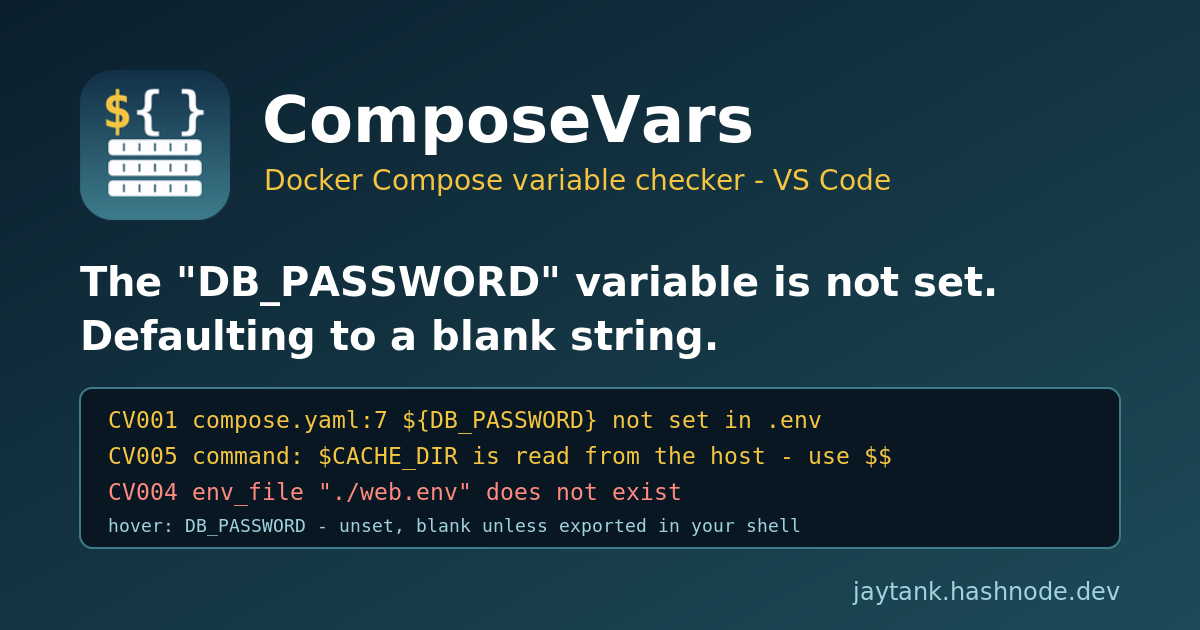
WARN[0000] The "DB_PASSWORD" variable is not set. Defaulting to a blank string.
Nothing stops. Compose carries on, creates the network, starts the containers. A minute later the database container exits because it refuses to initialise without a password, or worse, the app starts and connects to postgres://app:@db:5432/app and you spend twenty minutes reading connection errors before you scroll back up and find that one yellow line.
The confusing part is that the variable is set. It is right there in app.env, which the service loads with env_file:. So why does Compose say it is not?
TL;DR:
${VAR}in a compose file is filled on your machine, when Compose reads the file, from your shell and the project.envonly.env_file:feeds the container, not the compose file. A missing variable becomes a blank string with a warning, never an error, unless you write${VAR:?message}. And$VARinsidecommand:is interpolated from the host too; write$$VARif the container should expand it. ComposeVars checks all of this in VS Code, as you type.
Why "variable is not set. Defaulting to a blank string" happens
Here is the setup behind the example above. It is illustrative, but I have seen this exact shape in more than one repository:
# compose.yaml
services:
  db:
    image: postgres:16
    env_file: ./app.env
    environment:
      POSTGRES_PASSWORD: ${DB_PASSWORD}
# app.env
DB_PASSWORD=s3cret
There are two completely separate stages here, and they read different files.
Stage 1: interpolation. When you run any docker compose command, Compose parses the YAML and replaces every ${NAME} and $NAME in a value with text. It looks in exactly three places, in this order: variables exported in your shell, a file passed with --env-file, and otherwise the .env file in the project directory (the folder of the first compose file, unless you pass --project-directory). That is the whole list. The interpolation reference says that when a variable cannot be resolved and has no default, Compose shows a warning and substitutes an empty string.
Stage 2: container environment. After the model is built, env_file: and environment: decide what the process inside the container sees. app.env is read here, and only here.
So DB_PASSWORD in app.env is invisible to stage 1. The ${DB_PASSWORD} becomes "", POSTGRES_PASSWORD is set to an empty string explicitly, and that explicit empty value is what the container gets. The file that "has the variable" is working exactly as designed; it just feeds the wrong stage.
The naming does not help. The project .env and an env_file: often use the same syntax, and people frequently point env_file: .env at the project .env too, which makes it look like one mechanism. The Docker docs split it across two pages for a reason: variable interpolation (the .env file, "made available for interpolation") versus setting container environment variables (environment: and env_file:).
The other two traps
Bare pass-through keys. environment: [DEBUG], or DEBUG: with no value, means "copy DEBUG from wherever Compose is running". If it is not set there, Compose simply leaves it out of the container, and it does not even print a warning. How environment: and env_file: combine in this case has changed between releases, which is its own source of surprises (docker/compose#9031, docker/compose#11740).
$VAR in command: is evaluated on the host. This one surprises experienced people:
command: sh -c 'echo "cache dir is $CACHE_DIR"; exec ./server'
The single quotes protect nothing: they are YAML text. Compose sees $CACHE_DIR while loading the file and substitutes the value from your laptop, or a blank string, before the container shell ever runs. If the container is meant to expand it, the answer is to escape it as $$CACHE_DIR, which the interpolation docs describe as a literal $.
Evidence that this bites people
docker/compose#5505: "Make docker-compose fail when an undefined environment variable used in a compose file." The request is years old and the default is still a warning plus a blank string.
docker/compose#9031: inconsistent pass-through behaviour between
environmentandenv_file.docker/compose#11740: an
environmententry with no value stopped taking precedence overenv_file.Docker docs: interpolation reference, variable interpolation, precedence.
The manual fix
If you are here from a search with the warning on your screen, this is what to do.
1. Put interpolation variables in the project .env. Next to compose.yaml, not in the env_file::
# .env  (project directory, used for ${...} in the compose file)
DB_PASSWORD=s3cret
Or, if the value only belongs in the container, drop the interpolation entirely and let env_file: provide POSTGRES_PASSWORD directly.
2. Make required variables fail loudly. This is the single best habit:
POSTGRES_PASSWORD: ${DB_PASSWORD:?DB_PASSWORD is required}
Now Compose stops with an error instead of starting with a blank. Use ${VAR:-default} only for values that genuinely have a safe default, and never for passwords: a committed ${DB_PASSWORD:-hunter2} is a secret in git.
3. Escape container-side variables. $$HOME, $$CACHE_DIR in command:, entrypoint: and healthcheck.test.
4. Check the result. docker compose config prints the resolved model with the same warnings, and docker compose config --environment lists the interpolation variables. Both are useful, but only when you remember to run them, and config prints your secrets in clear text in the terminal.
ComposeVars: check Compose variables in the editor
I wanted that check to happen while I edit the file, not after the stack is up, so I built ComposeVars. It is a free VS Code extension that reads your compose files and the same env files Compose would read, and marks every problem on the right line.
code --install-extension jaytankdev.composevars
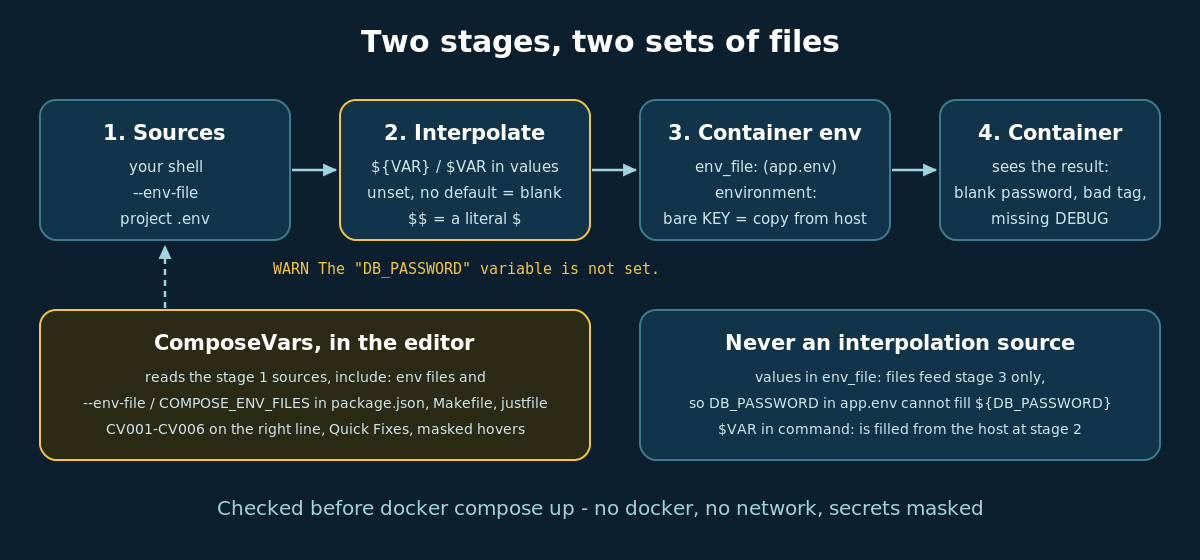
It picks up every docker-compose*.yml and compose*.yaml in the workspace, including override files and anything pulled in with include: or extends: file:. For each one it builds the interpolation sources the way Compose does: the .env in that file's folder, env files named in include:, and any --env-file <path> or COMPOSE_ENV_FILES=... it finds in your package.json scripts, Makefile or justfile. Files like .env.example, .env.sample, .env.template, .env.dist and example.env count as the "documented" set your team expects.
The rules:
| Code | Severity | Catches |
|---|---|---|
| CV001 | Warning | ${VAR} or $VAR that is not set anywhere and has no default (Information if it is in .env.example but missing from .env) |
| CV002 | Information | A key in the project .env that no compose file uses, usually a sign it was meant for env_file: |
| CV003 | Information | A pass-through environment: key with no value that is not set in .env |
| CV004 | Error | An env_file: path that does not exist |
| CV005 | Warning | Host-side $VAR in command:, entrypoint: or healthcheck.test, including ` |
| CV006 | Warning | A secret-looking variable with a committed default, like ${DB_PASSWORD:-hunter2} |
It understands the full Compose syntax: :- and - defaults, :? and ? required, :+ and + alternatives, nested defaults such as ${A:-${B:-x}} (the inner one is only checked when the outer one would fall through), $$ escapes, and $1 / $@, which Compose leaves alone. Only YAML values are checked, never keys, because that is what Compose interpolates.
Quick Fixes cover the usual answers. For CV001 you can make the blank explicit (${VAR:-}), require it (${VAR:?VAR is required}), or add VAR= to .env.example. CV005 offers the $$ escape, and CV006 swaps the committed default for :?.
Hover any variable and you see where its value comes from, for example .env line 4, --env-file (package.json line 3), default in compose file, or unset - blank unless exported in your shell. ComposeVars also has its own icon in the activity bar, with a badge for the finding count. Its Findings panel lists every problem by variable name (for example CV001 DB_PASSWORD), grouped by compose file, with inline Quick Fixes; values are never shown there, and passwords inside URLs are masked everywhere. The status bar shows the finding count, and ComposeVars: Show Resolved Variables opens a Markdown report per compose file: variable, line, source and value, plus the sources in precedence order.
Settings worth knowing: composeVars.ignoreVariables (defaults to HOME, USER, PATH, PWD, SHELL, LANG, TERM, LOGNAME, TMPDIR, which are assumed exported and not reported by CV001/CV003, though CV005 still flags them in commands), composeVars.disabledRules, composeVars.secretPattern, composeVars.maskAllValues, composeVars.scanScripts and composeVars.maxFiles (200).
Docker's own editor tooling (Docker DX and the Microsoft Container Tools extension) gives completion, hover and YAML validation for compose files, and dclint covers style and best-practice rules. As far as I could find, none of them resolve ${VAR} against .env. ComposeVars only does variables and env files, so it sits next to them rather than replacing them.
Privacy and safety
An extension that reads your .env files should be boring about it.
Values are masked. Anything matching the secret pattern (
*_PASSWORD,*_SECRET,*_TOKEN,*_KEYand similar) is shown as masked in hovers, the report and diagnostic messages.composeVars.maskAllValuesmasks everything.Workspace only. An
env_file,--env-fileorCOMPOSE_ENV_FILESpath that points outside your open folders, say../../.aws/credentials, is never opened, never checked for existence and never shown. Quick Fixes never create files outside the workspace.No network, no telemetry, no child processes. It only reads local files, so it also works in untrusted workspaces.
Limitations
It cannot see your shell. A variable you always
exportbefore running Compose will be reported by CV001. Add it tocomposeVars.ignoreVariablesor to.env.-ffile lists,COMPOSE_FILEand--project-directoryare not modelled; each compose file uses the.envin its own folder.--env-filevalues found in scripts are treated as always applied, which can hide a variable that only one script sets.The YAML reader is line-oriented. Multi-line flow collections and anchors merged across services are not handled.
The contents of
env_file:files are not checked, because they are container environment, not interpolation.Profiles are ignored, so a variable used only by an inactive profile is still reported.
FAQ
Why does Compose say my variable is not set when it is in my env_file? Because env_file: only sets the container's environment. ${VAR} in the compose file is resolved from your shell, --env-file or the project .env.
How do I make docker compose fail on a missing variable? Write ${VAR:?VAR is required}. There is no global switch; it is per variable.
How do I stop Compose replacing $VAR in my command? Escape it as $$VAR. The container shell then sees $VAR.
Does ComposeVars run docker? No. It never starts a process; it reads files and applies the documented rules.
Will it print my secrets? No. Secret-looking values are always masked, and values are never written anywhere.
Try it
Marketplace: ComposeVars
Install:
code --install-extension jaytankdev.composevarsSource (MIT): github.com/jay-tank/composevars
If it reports a variable Compose would actually resolve, or misses one it would blank, please open an issue with the snippet. Getting the resolution rules exactly right is the whole point.